

What a PoE 2 trade whisper does
The phrase PoE 2 trade whisper usually means the message sent after you find a listing. It is not the trade itself and it is not a private replacement for the official market. The message tells another player which listing you want, while the party invitation and in-game trade window complete the actual exchange. Keeping those stages separate makes it easier to diagnose a problem: a copied message can be correct even when a seller is offline, a listing is stale, or the trade site is slow.
On the official Path of Exile trade site, the Direct Whisper action prepares a listing-specific message. It normally includes the item name, the listed price, and a link or identifying context. Copy that message as supplied before you negotiate. Editing the amount before sending can create confusion because the seller sees a request for a different deal. If you want to offer another price, send the original request first and make the alternative explicit in a later message.
This article is narrower than the PoE 2 trade site guide. That page explains searching, filters and buying or selling. Here the output is a safe, repeatable handoff from one matching listing to one verified trade. A PoE 2 trade links guide is also different: it covers sharing a search or item URL, while a whisper is the message that asks a player to act.
Check the listing before you whisper
A minute spent checking the row prevents a long chain of wrong messages. Confirm the game and league selector, the item base, rarity, level or quality, sockets, corruption state and the modifiers that matter to your build. For currency, confirm the exact resource and quantity. For a unique, check the variant and roll range. For a rare, compare the important modifiers rather than trusting a similar-looking icon.
Read the seller name and listed currency exactly as shown. A listing can disappear, change price or become stale while you are comparing it. If the trade site shows several rows, compare more than the cheapest one. The first row may be offline, incorrectly configured or a different variant. A PoE 2 trade whisper is useful only when the message still describes the listing you intend to buy.
If you are selling, check your own public stash tab, quantity and price before replying. Do not promise an item that is reserved, in another character's tab or priced in a currency you do not have. A clear listing makes the later message short and reduces the chance that both players arrive with different expectations.
- Match the league and game context before copying any message.
- Verify item base, variant, modifiers, quantity and listed currency.
- Compare several recent rows instead of treating one cheap outlier as a guaranteed value.
- Keep the seller name and original amount visible until the trade is complete.
| Listing check | Why it matters | Safe action |
|---|---|---|
| League and game | A correct item in another league is still the wrong trade | Select the active PoE 2 league and rebuild the search if unsure |
| Item identity | Variants, bases and corruption can change the value | Read the name, icon and important rolls |
| Price and quantity | A copied amount is the seller's current request | Bring the exact currency and quantity |
| Seller status | Offline or stale rows waste repeated whispers | Try another current listing when the row does not respond |
Send the message and wait for the invite
Once the row passes your checks, use the official trade site's Direct Whisper button. Paste the complete message into the PoE 2 chat channel and send it once. Do not invite the seller first and do not send a string of repeated whispers. The seller may be mapping, sorting a full inventory, or handling another trade. One accurate request is easier to recognize than a burst of slightly different text.
The normal sequence is message, response, party invitation, travel, then trade window. An invitation usually means the seller has seen the request and is ready to continue. It does not mean the item is reserved forever. Keep the listing open and check the amount again if the conversation takes a while. If the seller asks you to change the price, make sure the new agreement is explicit before you travel.
When you are the buyer, prepare the currency in your own stash before accepting the party. Travel to the seller's hideout or the agreed town and wait in place. Let the seller initiate the trade window unless they clearly ask for another arrangement. When you are the seller, invite the buyer only when the item is available and the listed price is still correct. A calm handoff reduces accidental cancellations and makes suspicious changes easier to notice.
A Direct Whisper is a convenience, not a security token. It should never ask for a password, session cookie, API key or download. If a message redirects you to an unfamiliar domain or asks you to run a file, stop the trade and return to the official Path of Exile service.
- 1
Open the current listing
Keep the league, item details, seller name and price visible while you prepare the request.
- 2
Use Direct Whisper
Copy the listing-generated message unchanged, paste it into the in-game chat and send it once.
- 3
Wait for the party invite
Do not spam or invite first. Give the seller time to see the request and finish the current action.
- 4
Travel with exact currency
Bring the listed resource from your own stash, arrive at the agreed place and wait for the trade window.
Use a clear message when the listing changes
Sometimes a seller answers after the item has sold, the price has changed, or the listing is no longer visible. Do not pretend the old request is still valid. Reply with one short explanation, such as “Thanks, I was asking about the listed price; I will pass if it changed,” or ask whether the seller has another matching item. This is more useful than arguing over a stale row.
If no party invitation arrives, wait a few minutes and send one polite follow-up only when the listing still appears current. Then move to another row. Repeated messages can look like spam and cannot force an offline player to respond. When you change from buyer to seller, or from one item variant to another, start a new search and a new message so the conversation remains unambiguous.
A good trade message contains the item identity, the agreed price and the next action. Avoid sharing your account name beyond what the game already displays, and never send credentials or private session data as proof that you are a real player.
- State when a listed item or price has changed instead of silently changing the offer.
- Send at most one polite follow-up for a current row, then choose another listing.
- Start a fresh message when the item variant or currency changes.
- Keep private account data out of every trade conversation.
Complete the trade window safely
The final check happens inside the in-game trade window. Read the item again even if you inspected the listing. Compare the base, name, sockets, quality, modifiers, corruption state and any roll that affects your build. Scammers and honest mistakes both rely on speed: an item can be swapped after the first glance, or the listed currency can be replaced with a similar icon. Move slowly enough to read the final state.
The buyer should place the exact listed currency. The seller should check the number and type before accepting. If the price was negotiated, confirm the new agreement in chat and in the window. Never accept a split payment or a different resource just because the other player says the interface will convert it. Cancel, explain the mismatch and restart when the contents are not what you agreed.
A useful habit is to compare the final window with the original listing one last time: same character, same item, same price, same league context. The PoE 2 price checker guide can help you research a range before the whisper, but it cannot verify the item placed by another player. Only the live trade window can do that.
The official-domain trading etiquette discussion also recommends waiting for the seller to initiate the window and checking the exact item before accepting. Treat that as community guidance rather than a technical guarantee, and keep your own safety boundary: if a player pressures you to skip a check, leave the trade.
- Inspect the item in the final window, not only the listing screenshot or tooltip.
- Count the exact currency type and amount on both sides.
- Cancel and restart when a base, modifier, quantity or price changes.
- Do not share passwords, cookies, API keys, payment details or remote access.
- Leave the trade when urgency or pressure prevents a normal inspection.
| Final check | Buyer reads | Seller reads |
|---|---|---|
| Item identity | Base, name, variant, sockets and key rolls | The promised item, not a similar substitute |
| Payment | Exact currency and quantity are ready | Exact type and quantity are present |
| Change detection | Cancel if any detail differs from the listing | Explain a changed price before accepting |
| Consent | Accept only after a complete inspection | Accept only after both sides match the agreement |
When the whisper gets no response
No response does not automatically mean the PoE 2 trade whisper failed. The seller may be offline, in a map, dealing with another buyer, or looking at an outdated listing. Wait briefly, check whether the row is still present, and then try a different matching listing. If every listing fails, open the official trade site directly and run a broad manual search before changing your overlay or reinstalling anything.
If the official page loads but your copied message never reaches chat, isolate the local handoff. Confirm that the game window accepts normal text, that your clipboard contains the full message, and that another hotkey or overlay is not intercepting the paste. A manual trade search is a useful fallback because it separates a market problem from an Exiled Exchange 2 problem.
For a blank official page, repeated server errors or league-wide missing results, use the PoE 2 trade site troubleshooting guide. Record the time, URL, league and exact visible error. Do not use an unknown mirror, give someone remote access, or download a helper advertised in a suspicious chat message.
- 1
Test one fresh listing
A different seller tells you whether the first row was stale or unavailable.
- 2
Test manual paste
Paste ordinary text into chat to separate clipboard or hotkey failure from a trade-service issue.
- 3
Check the official page
Open the official trade2 address and confirm the game, league and broad query.
- 4
Keep a safe fallback
Save the item details and retry later; never bypass account controls with an unverified mirror.
How Exiled Exchange 2 fits the workflow
Exiled Exchange 2 can help you inspect an item and decide whether a listing deserves a closer look. It does not own the market, reserve a seller, send a guaranteed invite or replace the official trade window. Treat the overlay as a research companion: use it to understand an item, then confirm the current listing and send the PoE 2 trade whisper through the official flow.
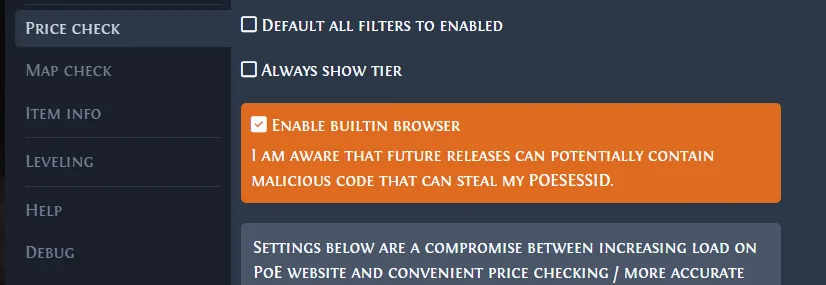
If the overlay opens a built-in browser or copies a query, verify the destination and the text before you send anything. The project screenshot below shows a local browser setting, not an official market result. A manual browser search remains the right fallback when the overlay, clipboard or hotkey is the layer that failed.
For local clipboard, hotkey and configuration checks, use the Exiled Exchange 2 troubleshooting guide. Keep the boundary clear: a healthy overlay can shorten research, but only the player-to-player conversation and final in-game window decide the trade.
- Use the overlay for item research and query handoff, not as a market or escrow service.
- Confirm the official domain before entering account details or following a listing.
- Switch to a manual search when clipboard, hotkeys or the local browser fail.
- Keep the final item and currency inspection inside the game client.
PoE 2 trade whisper summary
The safest PoE 2 trade whisper is a small, repeatable handoff: verify the listing, copy the unchanged Direct Whisper, wait for the invitation, travel with exact currency, and inspect the final trade window. If a detail changes, cancel and restart. A seller's silence, a stale row and a broken local hotkey are different problems, so test the smallest layer first.
Good trade etiquette is also good troubleshooting. One clear message, a patient wait and a complete final check protect both players better than repeated whispers or a rushed acceptance. Keep the official trade site and in-game window as your source of truth, and use Exiled Exchange 2 only where it helps you research the item.