
What PoE 2 trade history can and cannot answer
The phrase poe2 trade history usually describes a record of recent trade activity, not a permanent database of every market event. It can help you answer practical questions such as “Which item did I just buy?”, “Did that exchange finish?”, or “When did I contact this seller?” The exact fields and retention period depend on the live official service, so read the current page rather than assuming an old guide still matches the interface.
A trade history record is also different from an active listing. A listing says what someone is offering now; a completed-trade record says what the service reports about a past exchange. Neither one is the same as a price history chart, which summarizes market observations over time. Keeping these three ideas separate prevents a stale listing or a single completed transaction from becoming a fake “true value.”
For the live workflow, start with the official PoE 2 trade history view and use the official PoE 2 trade site for the current market. If the history page is unavailable or asks you to authenticate, do not paste credentials into a third-party price tool; follow the official account flow and verify the final trade in game.
How to check PoE2 trade history
The exact labels may change as Grinding Gear Games updates the trade service, but the verification sequence is stable. Open the official history page, make sure you are using the intended account and league context, then narrow the visible records before drawing a conclusion. If you are checking a purchase, keep the item name, approximate time and currency amount available so you can recognize the correct row.
Do not treat a browser row as a substitute for the in-game trade window. A browser record can help you find the transaction, while the game client is where you confirm the actual item, stack size, modifiers, sockets, corruption state and currency before accepting or disputing anything.
- 1
Open the official history view
Use the official PoE 2 trade history address or reach it from the official trade service. Follow the current sign-in or account-selection prompt instead of entering credentials on a mirror.
- 2
Set the right context
Check the account, league, character context and time range. A record from the wrong league can look plausible while answering a different question.
- 3
Match the item and amount
Compare the visible item name, quantity, currency, counterparty and timestamp with your own notes, chat or stash state. Use several fields together rather than relying on one similar name.
- 4
Confirm the final state in game
For an active or disputed trade, inspect the actual item and currency in the game client. Cancel when the item, price, league or quantity does not match the record.
Trade history vs sold history vs price history
Searchers often use “trade history,” “poe2 sold history” and “price history” as if they were interchangeable. They are not. Trade history is about your or the service's reported activity; sold history is about completed sale records when the source exposes them; price history is an aggregated market view. A page that shows current listings may help estimate a range, but it cannot silently turn asking prices into completed-sale data.
Use the table below to choose the right evidence. When a source does not expose a field, report that limitation plainly instead of filling the gap with a guessed timestamp or price.
| Record type | What it can answer | What it does not prove |
|---|---|---|
| Personal trade history | Which recent exchanges the official account view reports | That every old listing or chat became a completed trade |
| Sold history | Which sales a specific service identifies as completed | The buyer's full context, future resale value or a universal price |
| Active listing | What a seller is currently asking and whether supply exists | That the item will sell at that price or is still available |
| Price history | How observed prices or ratios moved across a time window | The exact price of your item or the outcome of one trade |
What to do when a trade record is missing
A missing row does not automatically mean the trade failed or that an account was compromised. First check the time range, league, account and spelling of the item. Then distinguish a completed exchange from a whisper, an ignored seller, a cancelled trade window, a stale listing or a third-party note. History pages can also have retention, indexing or service-availability limits that are outside an overlay's control.
If the record matters for a dispute, collect only the minimum useful evidence: approximate time, item and currency details, official URL, relevant in-game screenshots and your own transaction notes. Do not upload session cookies, full account exports or remote-control access to an unknown helper. For an outage, check the official service status and try again later rather than repeatedly changing unrelated overlay settings.
- Recheck the account, league, date range and character context.
- Separate a completed trade from a contact attempt or active listing.
- Compare item name, quantity, currency and timestamp together.
- Keep private credentials, session tokens and unrelated stash data private.
- Use the official support route when a genuine account or service issue remains.
Where Exiled Exchange 2 fits
Exiled Exchange 2 is a companion for item research. It can parse a hovered item, let you review the filters and open a comparison against current trade listings. That is useful when you are asking “What are similar listings asking now?” It is not the right source for “What did my account complete last night?” and it does not create an official audit trail.
The official release checked for this guide is v0.15.8, published June 20, 2026. That version fact describes the companion application's release state, not the availability or retention policy of the PoE 2 trade service. If the overlay produces an empty search, use the official trade-site guide and rebuild the query manually before assuming that a history record disappeared.
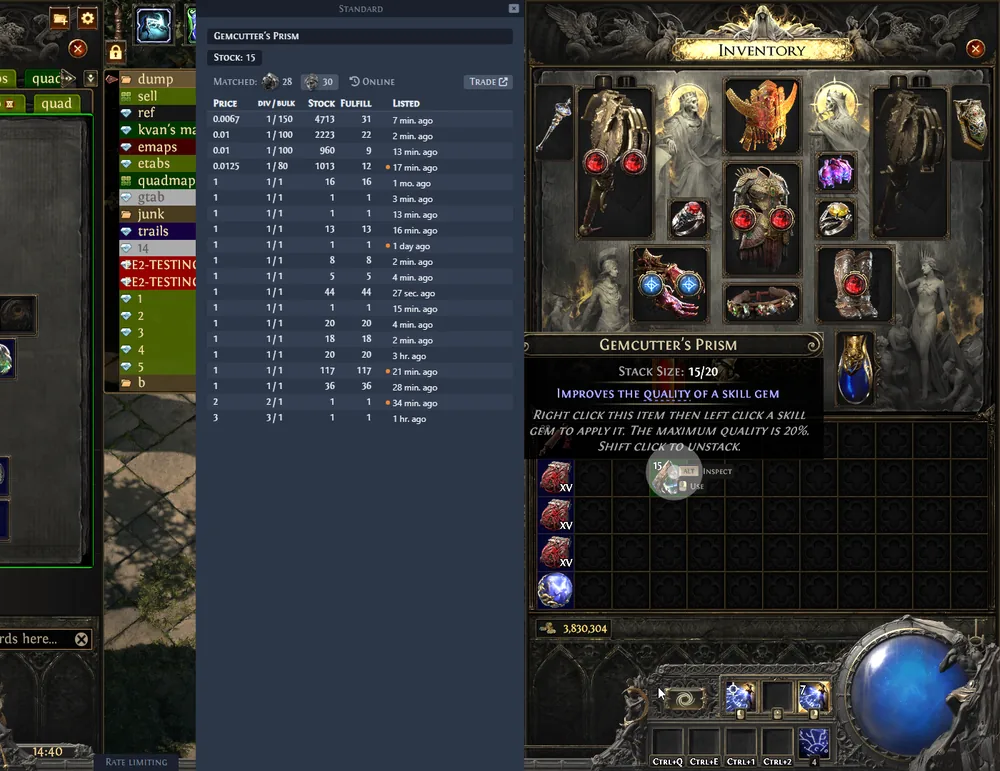
- Use the overlay for fast current-listing comparisons.
- Use official trade history for recent activity exposed by the service.
- Use the game client for final item and currency verification.
- Never describe an overlay result as a completed-sale database.
Use a price checker for current comparisons, not history
A PoE 2 price checker answers a different question: what range do comparable listings suggest right now? Start with the correct league and item type, keep the modifiers that create demand, and compare several recent listings. Then record your own conclusion separately from the history of what you actually bought or sold.
For a rare item, one cheap row can be stale, unavailable or a different variant. For currency, the ratio and liquidity matter more than a single equipment-style price. The PoE 2 price checker guide covers that current-comparison workflow; this page covers the record-keeping boundary so the two jobs do not get mixed.
Privacy, limits and safe checks
Trade records can reveal item names, counterparties, times and account activity. Share only what is needed to solve the problem. Redact account identifiers and unrelated chat, and do not publish session cookies, authorization headers, remote-desktop access or complete stash exports. A legitimate guide should never need those secrets to explain where a history page is located.
The official interface can change, a service can be temporarily unavailable, and a record can be delayed or incomplete. This guide therefore uses cautious wording: verify the live official page, keep a local note of important trades, and treat an absent row as an uncertainty to investigate—not proof of fraud, a guaranteed refund or a fixed market price.
- Use the official Path of Exile domain for account actions.
- Do not share credentials, cookies, tokens or remote access.
- Verify expensive trades inside the game client before accepting.
- Recheck the live page after a patch or service change.
- Document only the minimum facts needed for support.